The short answer
Use an automation platform when it supports your apps, business rules and recovery needs at an acceptable ongoing cost. Consider custom integration when important requirements do not fit. Compare the lifetime responsibility for the workflow, as well as the first build.
Start with the workflow, not the platform
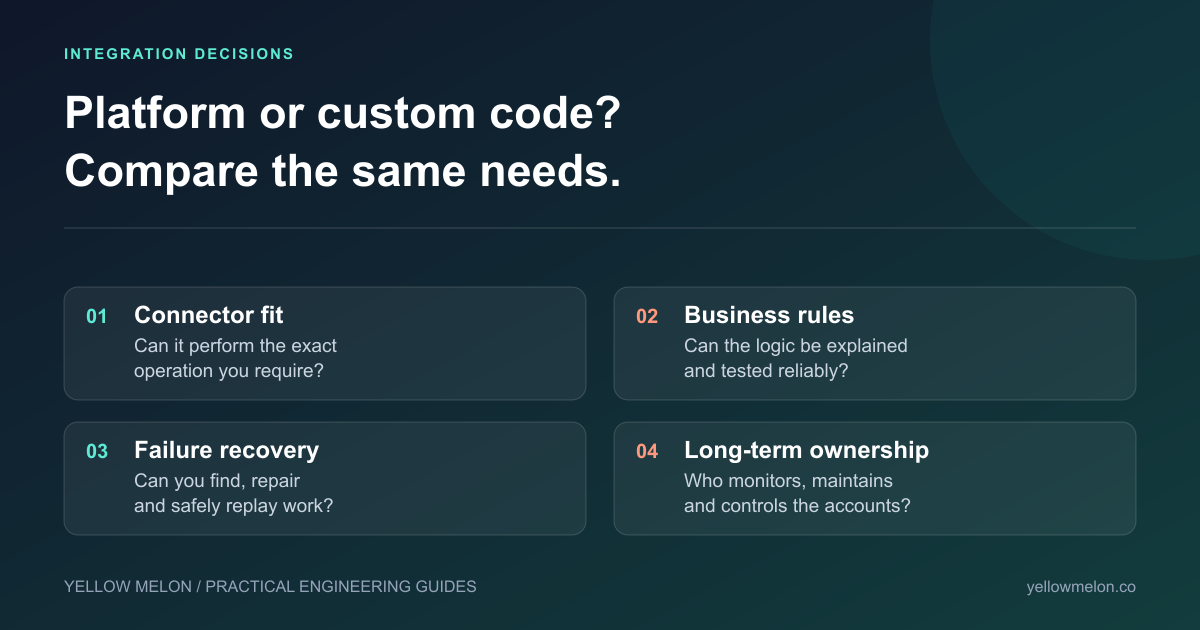
Write down which system owns each piece of information, what starts a change and where it must end up. Include exceptions: missing customer records, canceled orders, duplicate events and unavailable services. A connector’s presence in an app directory does not prove it supports the operation your business needs.
Ask for a demonstration using a representative example, including a failure. Can someone identify a stuck record and safely replay it? Can the business change a rule without losing track of which version ran? Those details often decide whether an integration is useful day to day.
Where each approach can fit
These are starting points for evaluation, not a universal ranking. Features, plans and connector coverage change. Check the current documentation against your exact requirements before purchasing.
| Approach | Worth evaluating when | Responsibility to clarify |
|---|---|---|
| Zapier | Supported apps and trigger/action steps cover the job | Account ownership, task usage, replay and connector limits |
| Make | A visual scenario helps explain branching and transformations | Error routes, incomplete work and who maintains scenarios |
| n8n | Its workflow model and deployment options fit your technical needs | If self-hosted: patching, backups, credentials and availability |
| Custom integration | Specific rules, interfaces or operational requirements need purpose-built code | Engineering ownership, tests, monitoring and future API changes |
Error recovery belongs in the original scope
Imagine a customer is created in the first system but the second system rejects the next step. Retrying the whole sequence might create a duplicate. A useful design records what succeeded and lets the operator resume or reconcile the failed part safely.
Zapier documents replay behavior, and Make documents error handlers and incomplete executions. These are capabilities to configure and test, not evidence that every workflow recovers automatically. A custom integration needs equivalent recovery behavior implemented deliberately.
Compare the ongoing costs and ownership
Include setup, subscription or hosting costs, expected usage, monitoring, maintenance and staff time handling exceptions. Model a realistic month and a busier month. A low initial quote can conceal a workflow that needs frequent manual repair.
Self-hosting can provide deployment control, but it transfers operational work to your team or supplier. n8n’s hosting documentation describes installation and operational responsibilities. Custom software also needs an owner when an API changes, a credential expires or a new business rule appears.
Keep platform accounts and credentials under the business’s control. Document the workflow, its dependencies and the escalation path. If the original consultant leaves, another person should be able to understand what runs and how to recover it.
When custom development is justified
Custom integration is worth considering when the required interface is unsupported, rules are difficult to express and test in the platform, or the business needs specific recovery and access controls. It is also possible to keep a platform for orchestration and implement one specialized component in code.
Before replacing an existing setup, identify its actual limitation. Repairing a brittle workflow may be more economical than rebuilding everything. Ask a supplier to explain why custom code is needed and what extra responsibility it creates.
Sources & further reading

About James Drummond
Founder of Yellow Melon and senior full-stack developer. James built and sold Smoothbook and has worked on systems for Universal Music Group, AllSaints and financial-services businesses.
Professional background →